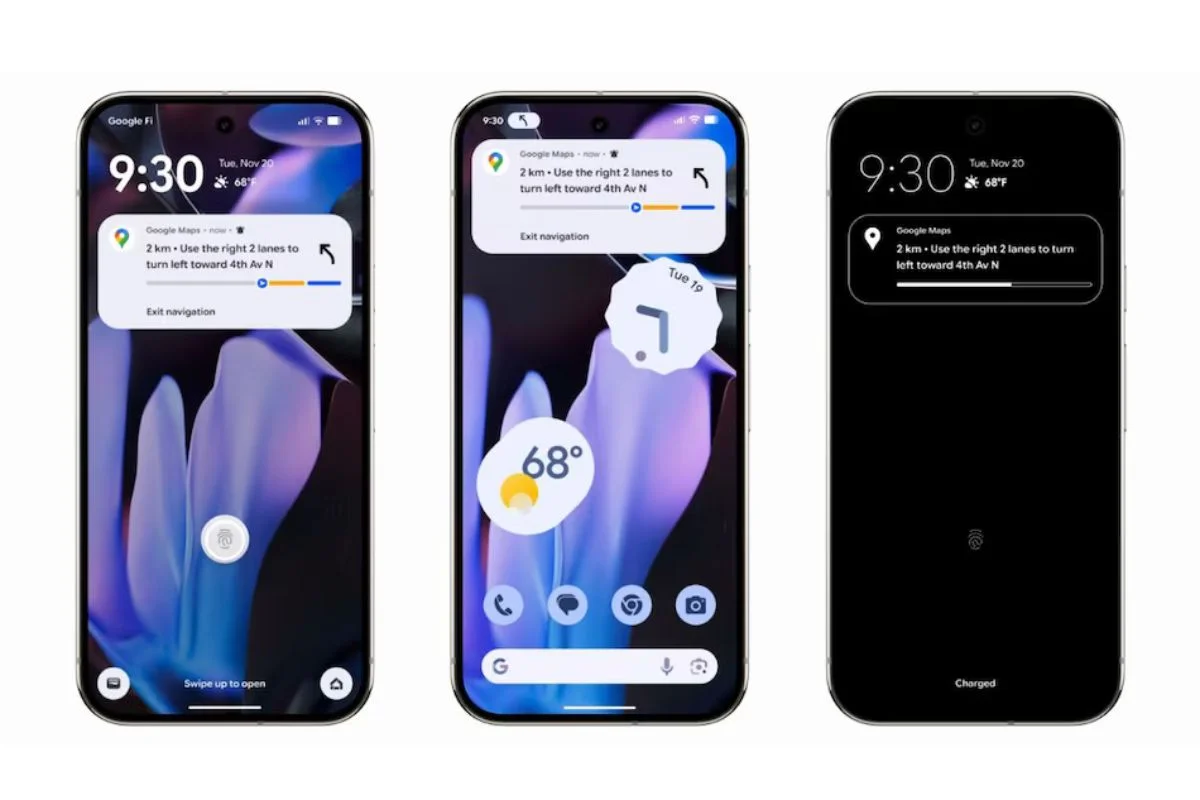
The all new Android 16 stable brings one of the highlight feature in Android 16 known as Google 16 Live Updates. Added to encourage user interaction and realtime data access, this feature lets Android applications show real time information on the lock screen, thus allowing user to get realtime updates without unlocking their devices.
What I Android 16 Live Updates?
The Android 16 Live Updates feature is taken from Apple’s Live Activities and its point are time-sensitive, real-time activities that commence and terminate within a specific time range. Those updates could be primary navigation, phone calls in progress, the progress of a ride-share or a food delivery.
Google says Android 16 Live Updates are designed to reduce the amount of times a user is required to unlock their phone. For example, when using Google Maps for navigation, the directions will display in the status chip on the home screen while the lock screen simultaneously displays the trip’s progress through Live Updates.
How To Super Android 16 Live Updates
These updates are visible only when the user opens an app. The presented material is intended to be… to grab It’s Up, someone’s attention and hold It until the end. Once the activity is over the Live Update is automatically removed from the lock screen.
Some common use cases for the Android 16 Live Updates:
- Ongoing phone calls
- Currently navigating with Google maps…hmmm
- Active ride-sharing updates
- Tracking food deliveries through apps such as Uber Eats or DoorDash
What Live Updates Can’t Be Used For
Google has listed the unacceptable use cases for Android 16 Live Updates. With this feature, developers cannot:
- Advertisements
- Promotional content
- Chat messages
- Upcoming calendar events
- General alerts
These kinds of notifications will rely on the standard Android notifications systems to be developed. For planned events, such as concert tickets or flights, Live Updates could kick in, but not until the event is about to happen.
Use Quick Settings tiles or app widgets for developers to let users quickly get to their app’s essential functions, even from the lock screen if needed.
Google’s Developer Guidance
Google has published lots of resources and guidance on their developer page to help developers use Android 16 Live Updates responsibly. The priority is to ensure the updates:
- Are user-triggered
- Represent real-time, ongoing activities
- Disappear when the activity ends
- Don’t distract user’s attention with unnecessary or advertisement content
That way the lock screen still contains relevant information, without being too distracting or invasive.
Why Android 16 Live Live Updates Are Important
The live updates feature on (Android)16 is a major update for those who use the device for navigation, location tracking and communication. This new graceful access to important details, right from the lock screen, helps you be quick on your feet.
So we never misuse it for advertisements or unrelated notifications, and of course, we never would allow Android 16 Live Updates to stop messaging, with no option even for deleting or disabling.