Google Chrome’s biometric authentication is at last expanding to password autofills, eliminating a major security hole that has made users nervous for years. Google Chrome for Android does indeed offer support for autofilling passwords with Google Password Manager, but until now, it was only possible to use biometric authentication with apps – not with the Chrome browser.
Under this forthcoming change, Chrome users will soon receive the same Google Chrome biometric authentication layer straight in the browser. This will mean the saved password will need to be verified using a fingerprint, face, or other screen lock to be autofilled. This enhancement means that if your phone is ever lost or stolen, bad guys won’t be able to gain access to your accounts without, well, you, because your biometrics would then be required.
At present Google Password Manager does have “Authenticate with biometric before filling” passwords option. This keeps apps from streamlining the autofilling process without your identity being first confirmed in two different ways but it’s only for apps. Chrome users have been exposed to a password autofill security loophole and Google is finally taking action.
The Google Chrome biometric authentication seems to have been rebranded to “Verify it’s you to autofill passwords,” according to reports. This new switch will be available on the main settings page of Google Password Manager. Its location and name are different, but it performs the same task: keeping your passwords safe until you say who you are.
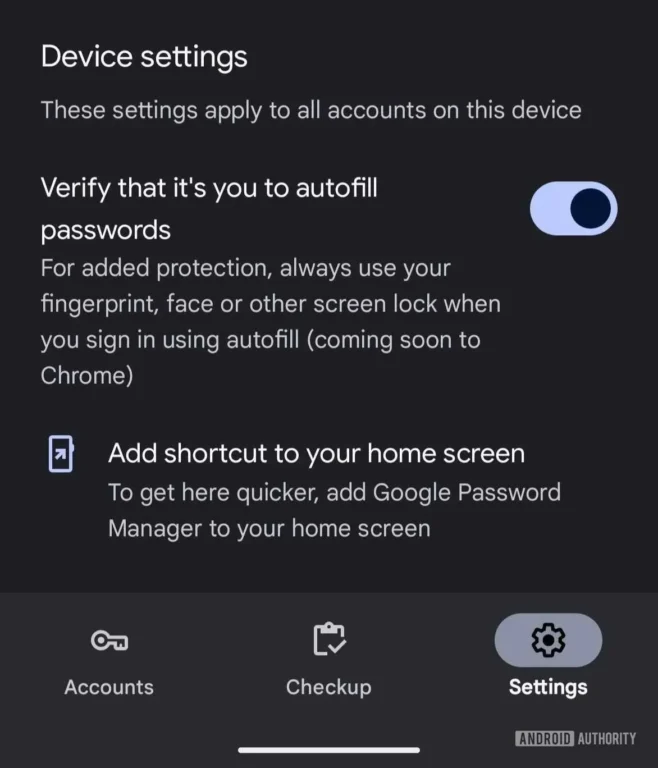
Google also recommend using a fingerprint, or other screen lock, or face unlock for this authentication. It will add an additional layer of security for Chrome, bringing the browser’s password autofill system in line with contemporary security guidelines.
The move comes after Android’s Identity Check feature, that aims to limit password autofils, if a device is detected to be in an untrusted location. With the Google Chrome biometric authentication now enabled, you can visit any Web sites with confidence that your saved password is protected.
This also demonstrates Google is dedicated to making Chrome more secure. Autofill services are helpful, but they put you at risk of someone getting a hold of your account details and logging into it without your permission unless you use Google Chrome biometric authentication. The fix is going to do away with that danger and hopefully give peace of mind to the millions of Chrome users the world over.
FAQs
Google Chrome biometric authentication is a security feature that needs fingerprint, face or is locked screen verification before inserting the saved passwords in Chrome.
Should your phone be stolen or accessed by others, it will prevent unauthorized users from signing in to your accounts.
Not for the browser itself, but Google is in the process of releasing the Google Chrome biometric authentication update for all users.
Android phones featuring Google Password Manager and friendly biometrics, such as fingerprint or face unlock will support it.